
Support
Integrating AI into your association
A transformation lever for the non-profit sector
The non-profit sector faces a paradox: on one hand, limited resources and often overwhelmed teams; on the other, a transformative technology that could change their daily operations but also raises concerns and hesitation.
Artificial intelligence is no longer a technology of the future. It is here, accessible, and offers extraordinary possibilities for associations: automating repetitive tasks, improving communication, assisting with writing, analyzing data, creating content… Time savings can reach 30% to 50% on certain administrative tasks.
But here is the reality on the ground : most associations have no framework for using AI. The result? Either no one uses it out of fear, or everyone uses it in an unstructured way, without control—bringing risks for data protection and the organization’s reputation.
This guide offers a pragmatic, field-tested method to integrate AI into your association in a secure, ethical, and truly useful way.
Who is this guide for?
- Directors and association leaders who want to structure AI usage within their organization
- Administrative and HR managers handling sensitive data daily
- Project coordinators looking to optimize their time and that of their teams
- Committed volunteers aiming to improve their organization’s efficiency
- Anyone in the non-profit sector who wants to demystify AI and use it confidently
What you will learn
- Understand the legal and ethical framework of AI in non-profits
- Classify your data to know what you can (or cannot) share with AI
- Set up essential governance tools (guidelines, prompt library, training)
- Identify practical use cases that will transform your daily work
- Train and support your teams through this transition
- Avoid common pitfalls and mistakes
Philosophy of this guide: no unnecessary technical jargon, no rigid dogma. Just pragmatism and solutions that actually work. The goal? To help you use AI with confidence—without paralyzing fear or uncontrolled usage.
Summary
Part 1: Understanding the Legal and Ethical Framework
- The European Regulatory Framework
- Ethics and Social Responsibility
- Responsibility and Documentation
Part 2: The 4 Data Categories Method
- Overview of the Method
- Category 1: Data Published on the Internet
- Category 2: Public Data (Non-sensitive)
- Category 3: Personal Data
- Category 4: Sensitive Data
- Grey Areas and How to Decide
- Decision Tree
Part 3: The 3 Essential Tools
- The AI Usage Charter
- The Shared Prompt Library
- Team training
Part 4: Measure and improve
Key indicators to track
Collection method
Continuous improvement

Part 1 : Understanding the Legal and Ethical Framework

1. The European Regulatory Framework
The AI Act: key takeaways
Europe is the first region in the world to have introduced specific legislation on artificial intelligence with the AI Act, gradually coming into force since 2024. This regulation classifies AI systems according to their level of risk:
The 4 risk levels :
- Unacceptable risk: Prohibited systems (behavioral manipulation, social scoring, etc.)
- High risk: Systems used in critical areas (employment, education, essential services) – strict regulation
- Limited risk: Transparency obligations (e.g., indicating that a chatbot is AI)
- Minimal risk: Free use (most tools you will use fall into this category)
Key point for associations: Although the AI Act does not impose direct sanctions on most associations (unless you are providing a high-risk AI system), it establishes best practices that are wise to adopt.
GDPR remains your main reference
Le RGPD (Règlement Général sur la Protection des Données) s'applique pleinement à l'usage de l'IA. C'est votre vrai garde-fou légal.
Principes fondamentaux à respecter :
- Minimisation des données : Ne collectez et ne partagez que les données strictement nécessaires
- Finalité : Les données doivent être utilisées uniquement pour l'objectif déclaré
- Transparence : Les personnes doivent savoir comment leurs données sont utilisées
- Sécurité : Les données doivent être protégées contre les accès non autorisés
- Droits des personnes : Droit d'accès, de rectification, d'opposition, etc.
THE GOLDEN RULE (non-negotiable):
Never share personal data with public generative AI tools (ChatGPT, Claude, Gemini, etc.)
Why this rule is absolute:
When using public generative AI:
- Your data may be used to train models (depending on terms of service)
- It could potentially reappear in responses to other users
- You lose control over storage and usage
- In case of a data breach, your legal responsibility is engaged
Exception: Some tools offer enterprise versions with guarantees that data is not used for training (e.g., ChatGPT Enterprise, Claude for Work). In such cases, contractual guarantees change the situation.

2. Ethics and Social Responsibility
Beyond legal compliance, associations carry a specific ethical responsibility.
Your values must guide your use of AI
Associations often serve missions of public interest, solidarity, and rights advocacy. Your use of AI must align with these values:
- Transparency: Inform beneficiaries, partners, and funders about your use of AI
- Non-discrimination: Be aware of algorithmic bias that may reproduce or amplify inequalities
- Respect for dignity: Especially crucial when working with vulnerable populations
- Sustainability: AI has a significant environmental footprint, to consider within your CSR approach
Questions to ask before adopting an AI tool
- Transparency: Is the provider clear about how the AI works?
- Data: Where is the data stored? Who has access?
- Bias: Has the tool been tested to avoid discrimination?
- Social impact: Does this tool align with your mission?
- Dependency: What happens if the provider disappears or changes its terms?

3. Responsabilité et documentation
Qui est responsable en cas de problème ?
Principe clé : C'est toujours l'utilisateur humain qui est responsable, jamais l'IA.
Si une IA produit une information erronée que vous diffusez, c'est votre responsabilité. Si vous partagez des données personnelles avec une IA et qu'il y a une fuite, c'est votre responsabilité.
Conséquences pratiques :
- Toujours vérifier les informations produites par l'IA
- Ne jamais utiliser l'IA comme excuse ("c'est l'IA qui a fait l'erreur")
- Documenter vos processus et décisions
- Former vos équipes à l'usage responsable
L'importance de la documentation
Gardez une trace de :
- Quels outils IA vous utilisez et pourquoi
- Quelles données sont (et ne sont pas) partagées avec ces outils
- Qui dans l'équipe est autorisé à utiliser l'IA et pour quelles tâches
- Les incidents éventuels et les mesures correctives prises
Cette documentation vous protège juridiquement et facilite l'amélioration continue de vos pratiques.
Part 2: The 4 Data Categories Method
1. Overview of the Method
This is THE core of the methodology. Once you master this classification, you avoid 99% of the risks related to AI usage.
The principle is simple: before sharing ANY information with an AI, you must classify it into one of these 4 categories. Each category has its own rules of use.
Category 1: Data Published on the Internet
Definition
These are the pieces of information that your association has itself published on the web: website, social media, public activity reports, press releases, etc.
Can it be shared with AI? YES, BUT…
Main risk : AI may mix your information with other sources and create inconsistencies.
Concrete example : Your association is called “Les Jardins Solidaires” and offers urban gardening workshops. There may be another association with a similar name focused on agricultural integration. If you ask the AI “Write a presentation of Les Jardins Solidaires,” it may mix the two and produce an inaccurate description.
Best practices :
- Provide the AI with your own definition in the prompt
- Create reference prompts in your shared library
- Systematically verify factual information produced
- Do not assume the AI “knows” who you are
- Do not use AI-generated information without verification
Appropriate use cases
- Ask to rewrite a text from your website in a shorter version
- Generate variations of your communication messages
- Create FAQs from your public content
- Translate your publications
3. Category 2: Public Data (Non-sensitive)
Definition and decisive test
These are pieces of information that, if known by anyone, would have no negative impact on anyone.
The door test: Imagine that this information is written on a sign on your office door. Could a random passerby cause harm by reading it? If not, it is public data.
Masterclass example: “FLE class for Refugee Food on Tuesdays from 2pm to 4pm” written on a door → Public information. No consequence if someone sees it.
Can it be shared with AI? YES
Examples of public data:
- Schedules of your public activities
- Dates of your public events
- General description of your programs
- Topics of your workshops/trainings
- Address of your office
- Mission and values of your association
- Overall budget (if you are transparent about it)
Appropriate use cases:
- “Generate a schedule of our public workshops for next month”
- “Create a LinkedIn post announcing our event on circular economy”
- “Write a description of our mentoring program for our brochure”
- “Help me structure a training module on project management”
Be careful with details : Even for public data, avoid providing elements that, when combined, could become sensitive.
4. Category 3: Personal Data
GDPR definition
Personal data is any information relating to an identified or identifiable natural person.
Direct personal data:
- First and last name
- Personal email address
- Phone number
- Postal address
- Photo where the person is identifiable
- Social security number
Indirect personal data (identification possible through combination):
- “The beneficiary who attends Monday classes” (if only one person matches)
- Combination of age + city + situation (if it allows identification)
- Detailed professional background
Can it be shared with AI? NEVER
Absolute rule: “Never never never never”
No exception. No circumstance. Never.
Common mistakes to avoid
❌ "Write an email to Jean Dupont to confirm his registration"
✅ "Write a registration confirmation email to send to a new beneficiary"
❌ "Here is the list of our 30 members with their emails: [list]. Create groups."
✅ "Give me relevant criteria for forming working groups of 5-6 people"
❌ "Analyze this Excel file with our beneficiaries' contact details"
✅ Anonymize first, or work with a sample containing no identifying data
What to do when you need to work with personal data
Possible options:
- True anonymization: Replace all identifying elements with codes
- “Jean Dupont” becomes “Beneficiary_001”
- “jean.dupont@email.com” becomes “contact_001@anonymous.fr”
- Similar fictional data: Create invented but realistic profiles
- Useful for testing formats and processes
- AI can even help generate this fictional data!
- Work with empty models/templates:
- “Create a beneficiary tracking template with the fields: first name, last visit date, satisfaction level”Then fill it manually with real data
- Use a local or private AI:
- For large organizations, consider an internal AI solution
- More complex and costly but with full control over data
5. Category 4: Sensitive Data
Definiton
Beyond personal data, some information is sensitive for other reasons :
GDPR sensitive data (special category):
- Racial or ethnic origin
- Political opinions
- Religious or philosophical beliefs
- Trade union membership
- Genetic or biometric data
- Health data
- Sexual life or sexual orientation
- Data relating to criminal convictions
Strategically sensitive data for the association:
- Confidential strategy (e.g., merger project)
- Detailed non-public financial information
- Ongoing negotiations with partners
- Grant applications not yet submitted
- Internal conflicts or HR issues
- Data related to disputes
Can it be shared with AI ? NEVER
Same absolute rule as for personal data.
Specific cases in the non-profit sector
Many associations work with vulnerable populations and therefore handle sensitive data daily:
- Migrant support organizations → origin, administrative status
- Mental health organizations → health data
- LGBTQ+ organizations → sexual orientation
- Victim support organizations → legal data
- Social integration organizations → sometimes health or legal data
Maximum vigilance required: Train ALL staff and volunteers. A single incident can destroy the trust of your beneficiaries.
6. Grey Areas and How to Decide
What is a “grey area”?
Information that is neither fully public nor clearly personal or sensitive.
Example: “General information about beneficiaries” – not sensitive but not fully public either.
Other common examples:
- “Our beneficiaries are mostly women aged 30–45” → Aggregated data, but reveals information
- “Our main partner is facing financial difficulties” → Strategic information that could harm you if leaked
- “We lost 20% of our members this year” → Negative but not strictly confidential
Decision method
- Ask yourself :
- If this information were public, who could be harmed? (beneficiary, organization, partner?)
- What would be the severity of the harm? (low, medium, serious)
- Do I have explicit consent from the people concerned?
- Could this information be used against us or our beneficiaries?
In case of doubt → apply the precautionary principle
If you hesitate, consider the information as sensitive and do not share it.
- Solution for grey areas: prompt library
Rather than letting the AI rely on its own information (potentially incorrect or misaligned), create a controlled description of what you want to describe.
Example: Instead of asking “Write a presentation of our beneficiaries” (and letting AI invent), create a prompt:
“Beneficiary context: We support people undergoing career transitions, of all ages and backgrounds. Our approach is personalized and supportive.
[Use this description in all content.]”
This way, you control the message while staying within appropriate generalities.
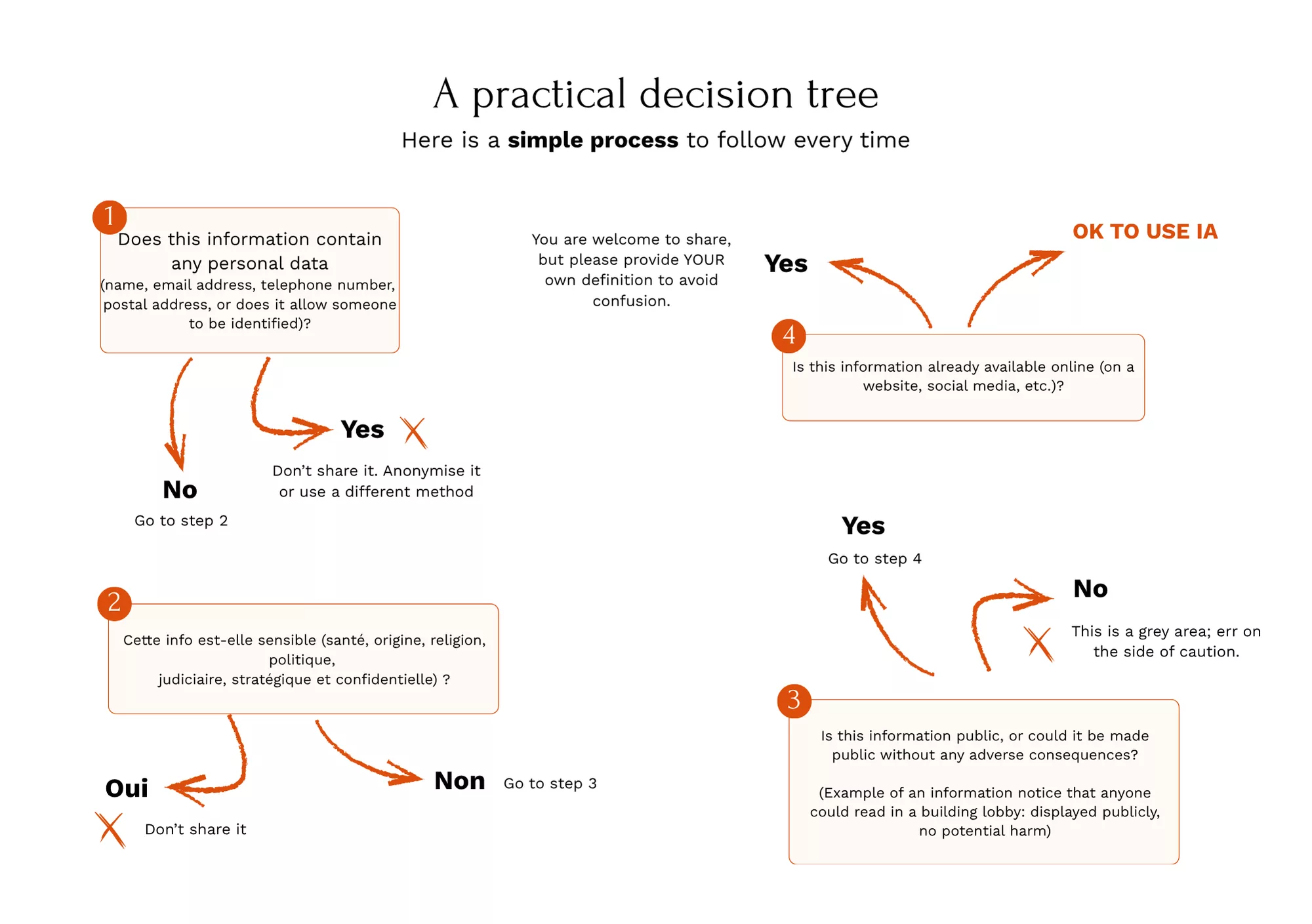
7. Decision Tree
Part 3: The 3 Essential Tools
1. The AI Usage Charter
Why? Your internal constitution for AI usage.
A charter is your internal constitution for the use of AI. It sets the framework, defines the rules, and clarifies responsibilities.
Benefits:
- Legally secures the organization
- Reassures employees, volunteers, and beneficiaries
- Clarifies what is allowed and what is not
- Makes everyone accountable
- Facilitates onboarding of new members
Demonstrates your professionalism to funders and partners
Content of a complete charter
PREAMBLE
- Why the organization uses AI (time savings, improved quality, etc.)
- Values guiding this usage (ethics, transparency, data protection)
GENERAL PRINCIPLES
- Humans remain the final decision-makers
- AI is a support tool, not a substitute for human judgment
- Transparency: we inform about our use of AI when relevant
- Personal data protection: absolute priority
PROHIBITED DATA
- Personal data: names, contacts, identifiers
- Sensitive GDPR data: health, origin, religion, etc.
- Confidential strategic data: [specific list to be completed]
- Sanctions in case of non-compliance
AUTHORIZED USES
- List of approved tools (free ChatGPT, Claude, Gemini, [specific tools])
- Tasks for which AI can be used:
- Writing and rewriting non-sensitive texts
- Idea generation and brainstorming
- Translation
- Creating schedules, document structures
- Summarizing public documents
- [Others depending on your context]
PROCESSES AND RESPONSIBILITIES
- Before using AI: verify data classification
- Always verify generated information
- In case of doubt: consult [designated person]
- Obligation to use the prompt library for recurring uses
- Document sensitive or new uses
TRAINING AND SUPPORT
- All employees/volunteers must complete initial AI training
- Annual training updates
- Available resources: [prompt library, contact person, etc.]
CHARTER REVIEW
- Annual review or whenever regulatory/technological changes require it
- Amendments can be proposed by anyone
SIGNATURE AND COMMITMENT
- Each employee/volunteer signs the charter
- Commitment is reaffirmed at each review
2. The Shared Prompt Library
The concept: A shared document (Google Doc, Notion) containing all pre-written and validated prompts.
Why is it a game changer?
- Consistency : everyone uses the same definitions
- Time saving : no need to reinvent the wheel
- Security : validated and compliant prompts
- Training : new members learn from examples
Recommended structure:
PROMPT LIBRARY
[PROMPT-001] Association presentation (short)
CONTEXT:
“[Association name] is a non-profit organization created in [year].
Our mission: [mission].
We operate in [territory] and support [target audience] through [actions].
Values: [values].”
PROMPT:
“Based on this context, write a presentation of [X words] for [use].”
[PROMPT-002] Social media post
CONTEXT:
“Event: [type].
Date: [date].
Location: [location].
Audience: [audience].
Objective: [objective].”
PROMPT:
“Write a post for [platform] announcing this event.
Tone: [tone].
Length: [X characters].
Call to action.”
[PROMPT-002] Post réseaux sociaux
CONTEXT:
“Event: [type].
Date: [date].
Location: [location].
Audience: [audience].
Objective: [objective].”
PROMPT:
“Write a post for [platform] announcing this event.
Tone: [tone].
Length: [X characters].
Call to action.”
How to use it:
- Find the corresponding prompt
- Copy context + prompt
- Customize with YOUR information
- Paste into the AI
- Verify before use
Create your prompts:
- Identify a recurring task
- Separate constants (context) and variables
- Write the context (public data only)
- Write the prompt (clear and specific)
- Test and refine
3. Team training
Minimum program (3 hours):
Module 1: Understanding AI (30 min)
- What is it? How does it work?
- What it can/cannot do
- Limits and risks
Module 2: Legal framework (45 min)
- GDPR and AI
- 4-category method ⭐
- Practical classification exercises
- The association’s charter
Module 3: Practical use (1h30)
- Overview of tools (ChatGPT, Claude, Gemini)
- Anatomy of a good prompt
- Prompt library
- Workshop: create content
Module 4: Responsibility (15 min)
- You are always responsible
- Always verify
- Environmental impact
After the training:
- Accessible AI referent
- Dedicated communication channel
- Quarterly advanced sessions
- Continuous feedback
Part 4: Measure and improve
Key indicators to track
Adoption
- % of team trained
- % of regular users (year 1 target: 60%)
- Frequency of use
Performance
- Time saved/week (survey)
- Satisfaction (scale 1–10)
- Quality of outputs
Security
- Incidents (target: 0)
- % who signed the charter (target: 100%)
Collection method
Quarterly survey (5 min)
- Frequency of use
- Types of tasks
- Time saved
- Satisfaction
- Difficulties encountered
- Training needs
Continuous improvement
Quarterly cycle:
- Month 1: Data collection
- Month 2: Analysis + improvements
- Month 3: Deployment
Annual review:
- Quantitative and qualitative assessment
- Strategic decisions
- Document updates
Final message
AI is neither a threat nor a magic solution. It is a powerful tool that, when used properly, significantly improves the efficiency of your association.
The key ? Combine pragmatism (use AI for what it does well) and responsibility (protect your data, verify, keep humans at the center).
AI will never replace empathy, creativity, moral judgment, and human relationships that are at the core of your mission. But it frees up time so you can dedicate even more of these human qualities to your beneficiaries.
That’s AI serving humans.